
Most enterprise software is built as if the person using it has infinite patience, perfect memory, and a second monitor permanently dedicated to the documentation. It is not, and neither do the people using it.
The average knowledge worker is interrupted every 11 minutes. It takes nearly 23 minutes to return to deep focus after a distraction. And yet the majority of B2B and enterprise tools are designed as if context switching is free, as if toggling between five browser tabs, re-entering the same patient ID into three different systems, and waiting 8 seconds for a loading spinner is just a “minor inconvenience”.
When our team set out to build an AI-powered radiology platform designed to bridge one of the most acute clinical talent gaps in emerging markets, where a single radiologist may be responsible for the imaging needs of an entire region, these UX failures stopped being “minor inconveniences” but became life-or-death design decisions.
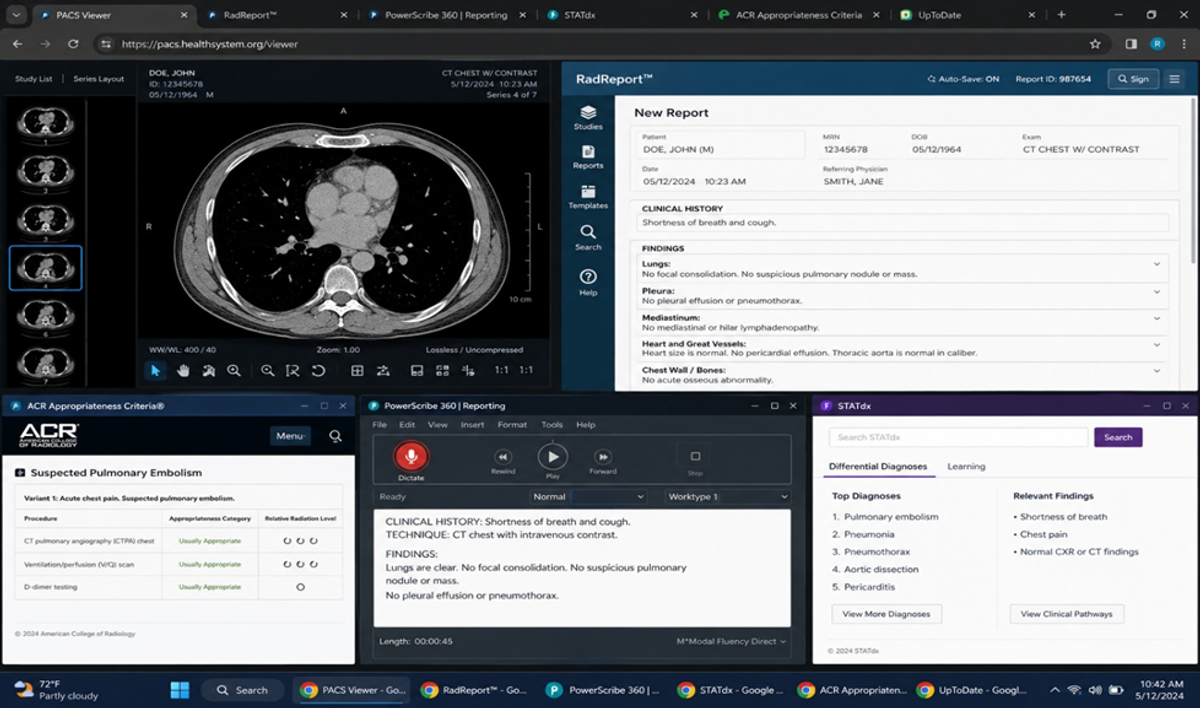
The Hidden Cost of Context Switching and Why It Kills More Than Productivity
Here is what a radiologist's morning looked like before modern teleradiology infrastructure existed in many parts of Nigeria:
- Receive a physical CD or USB drive from a radiographer.
- Insert it into a workstation running a legacy PACS viewer that may or may not be compatible.
- Log in to a separate RIS system to pull the patient's clinical history.
- Dictate findings into a voice recorder or type them into a third system.
- Hand off to a secretary who transcribes the report into a fourth format.
- Wait for the report to be physically delivered or scanned and emailed to the referring clinician.
That is six separate systems involved in a single diagnostic report. Six transitions. Six moments where information is potentially lost, duplicated, mistyped, or delayed.
Now zoom out. How many power users are doing the same thing, pivoting between Slack, their CRM, a spreadsheet, your product, and their email, to complete what should be a single, unified workflow?
Context switching is not a user problem. It is a product failure. If your tool forces users to leave it to complete their core task, you have not actually built the tool they need.
Where Time is Actually Lost: It’s Never Where You Think
When teams analyze workflow inefficiency, they tend to focus on the core task. In radiology: reading the scan. In sales: closing the deal. In engineering: writing the code.
But the core task is seldom where the time goes.
In our user research interviews with radiologists and radiographers across Nigeria, we found that the actual image interpretation, the skilled, irreplaceable human judgment part of the job, was often the fastest element of the workflow. A trained radiologist can read a chest X-ray in four to seven minutes. What surrounded that four-minute task could take forty.
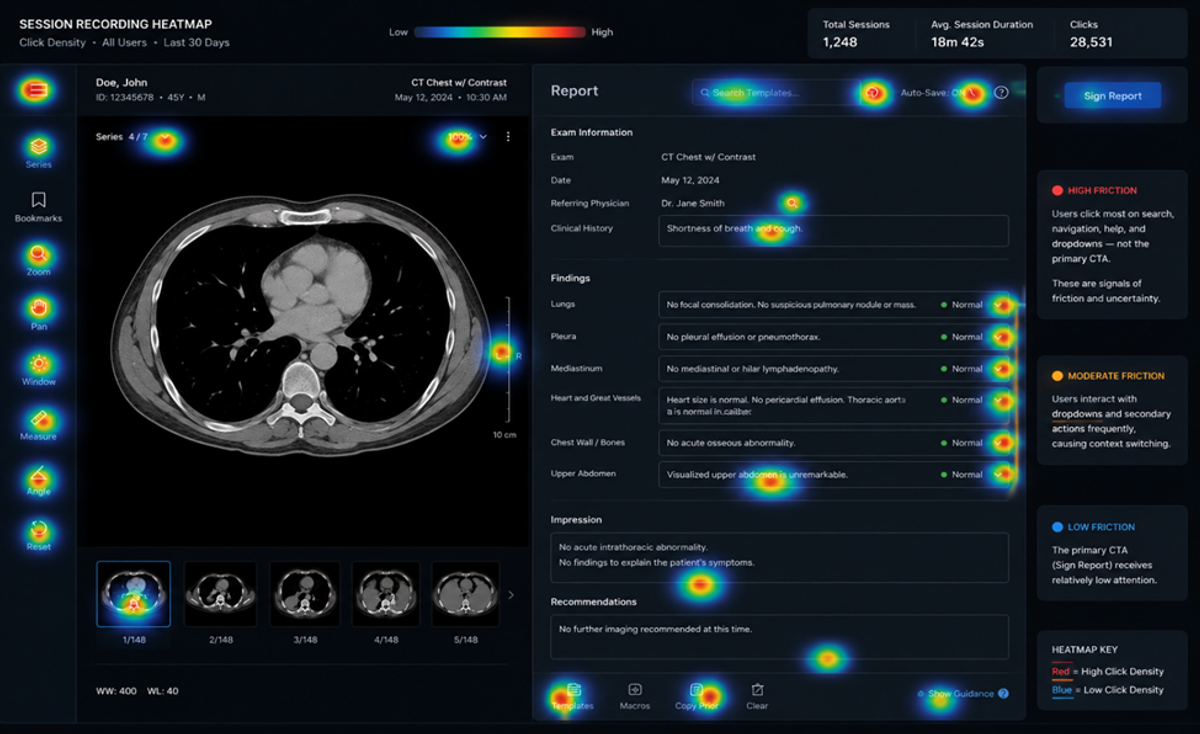
The Micro-Interaction Tax
Here is where that time actually went:
- Reporting scaffolding: Creating the document structure, entering the patient identifier, formatting the sections, i.e., the administrative frame around the clinical content.
- System authentication: Re-logging into systems that had timed out, resetting passwords that expired, and waiting for MFA codes on a second device.
- Data re-entry: Typing information that already existed somewhere else in the system into a new field in a different system.
- Loading and latency: Waiting for large DICOM files to render, for PACS systems to connect, for PDF exports to generate.
- Finding the right tool: Locating the correct function in a complex menu system, remembering keyboard shortcuts, searching for filters that should be one click away.
None of these is the core task. All of them are the product's fault.
The enemy of a good workflow is not the hard parts. It's the unnecessary parts. Every second a professional spends on administrative friction is a second stolen from the work that only they can do.
Applying This Beyond Radiology
Think about your own product. Where do your power users actually spend their time? Pull your session recordings. Watch five of them without commentary. Count every moment where the user is doing something that is not the core task they came to complete.
That count is your friction audit. Each item on it is a design debt that is costing your users time and costing you retention.
- What to measure: Time from session start to first meaningful action. Number of clicks to complete the core workflow. Number of times users navigate away from your product mid-task.
- What to look for: Form fields that require users to look up information they cannot reasonably remember. Loading states that appear without progress indicators. Empty states that offer no guidance on what to do next.
The Friction You Tolerate Is the Work That Doesn't Get Done
Radiology did not teach us anything good that product thinking had not already implied. It just made the stakes impossible to ignore and, in doing so, made complacency inexcusable.
Reduce context switching. Audit where time actually goes, not where you assume it does. Design for the professional in the room, not the idealised user in the persona document.
The best professional tools disappear into the work. They earn trust not through feature lists, but through the quiet, consistent experience of never being in the way.
Your users came to do great work. The only question is whether your product helps them, or quietly prevents them from getting there.


